> ## Documentation Index
> Fetch the complete documentation index at: https://docs.learningcommons.org/llms.txt
> Use this file to discover all available pages before exploring further.
# Quickstart
> Get started with Knowledge Graph: use the REST API or MCP server, or download JSONL data files for local querying.
export const EarlyAccessCallout = ({children}) => ;
## Using Knowledge Graph
You can access Knowledge Graph data in several ways:
* [Local files](#local-files)
* [REST API](#rest-api)
* [MCP server](#mcp-server)
* [Claude connector](#claude-connector)
Each access method has their own unique [use cases and benefits](/knowledge-graph/understanding-knowledge-graph/introduction#how-to-access-knowledge-graph).
## Steps
Query the Knowledge Graph for the educational data you're interested in.
See [download options](/knowledge-graph/using-knowledge-graph/local-files#download-options).
Install [`jq`](https://jqlang.github.io/jq/) ↗, a lightweight command-line JSON processor.
Query your downloaded files for the data you're interested in.
e.g., To get Common Core Math Standards, filter for nodes with a [`StandardsFrameworkItem`](/knowledge-graph/graph-reference/academic-standards#standardsframeworkitem) label, a `Multi-State` [jurisdiction](/knowledge-graph/graph-reference/value-and-format-standards#jurisdictionenum) (Common Core), and a `Mathematics` [academic subject](/knowledge-graph/graph-reference/value-and-format-standards#academicsubjectenum):
```shellscript theme={null}
jq -c 'select((.labels | contains(["StandardsFrameworkItem"])) and .properties.jurisdiction == "Multi-State" and .properties.academicSubject == "Mathematics")' nodes.jsonl > common_core_math_standards.jsonl
```
The API is in early access and is actively evolving. We will continue expanding it, and breaking changes may occur as we improve accuracy and reliability. Email [support@learningcommons.org](mailto:support@learningcommons.org) ↗ with your feedback or issues.
Retrieve a list of [Academic Standards](/knowledge-graph/graph-reference/academic-standards) for Multi-State Mathematics.
Sign up for the [Learning Commons Platform](https://platform.learningcommons.org?utm_source=docs\&utm_medium=knowledge-graph) ↗ to generate an API key and get your base API URL.
Send a request to the `GET /standards-frameworks` API endpoint to get the `caseIdentifierUUID` for Multi-State Mathematics.
```shell cURL theme={null}
curl -X GET \
-H "x-api-key: YOUR_API_KEY" \
"https://api.learningcommons.org/knowledge-graph/v0/standards-frameworks?academicSubject=Mathematics&jurisdiction=Multi-State"
```
```python Python theme={null}
import os
import requests
# Setup
api_key = os.getenv("API_KEY") # Your API key from Learning Commons Platform
base_url = os.getenv("BASE_URL") # Your base URL from Learning Commons Platform; follows https://api.learningcommons.org/knowledge-graph/v0 format
headers = { "x-api-key": api_key }
response = requests.get(
f"{base_url}/standards-frameworks",
headers=headers,
params={
"academicSubject": "Mathematics",
"jurisdiction": "Multi-State"
}
)
result = response.json()
print(result)
```
```javascript JavaScript theme={null}
const apiKey = process.env.API_KEY; // Your API key from Learning Commons Platform
const baseUrl = process.env.BASE_URL; // Your base URL from Learning Commons Platform
const response = await fetch(
`${baseUrl}/standards-frameworks?academicSubject=Mathematics&jurisdiction=Multi-State`,
{
method: 'GET',
headers: { 'x-api-key': apiKey }
}
);
const data = await response.json();
console.log(data);
```
Copy the `caseIdentifierUUID` from the response to use in the next step.
Use the `caseIdentifierUUID` with the `GET /academic-standards` API endpoint to retrieve the individual standards for that framework.
```shell cURL theme={null}
curl -X GET \
-H "x-api-key: YOUR_API_KEY" \
"https://api.learningcommons.org/knowledge-graph/v0/academic-standards?standardsFrameworkCaseIdentifierUUID=YOUR_UUID_FROM_STEP_1"
```
```python Python theme={null}
import os
import requests
# Setup
api_key = os.getenv("API_KEY") # Your API key from Learning Commons Platform
base_url = os.getenv("BASE_URL") # Your base URL from Learning Commons Platform
framework_uuid = "YOUR_UUID_FROM_STEP_1" # Copy from Step 1 response
# Make request
headers = {
"x-api-key": api_key
}
response = requests.get(
f"{base_url}/academic-standards",
headers=headers,
params={
"standardsFrameworkCaseIdentifierUUID": framework_uuid
}
)
result = response.json()
print(result)
```
```javascript JavaScript theme={null}
const apiKey = process.env.API_KEY; // Your API key from Learning Commons Platform
const baseUrl = process.env.BASE_URL; // Your base URL from Learning Commons Platform
const frameworkUuid = "YOUR_UUID_FROM_STEP_1"; // From Step 1 response
const response = await fetch(
`${baseUrl}/academic-standards?standardsFrameworkCaseIdentifierUUID=${frameworkUuid}`,
{
method: 'GET',
headers: {
'x-api-key': apiKey
}
}
);
const data = await response.json();
console.log(data);
```
```json Response theme={null}
{
"data": [
{
"identifier": "e1755456-c533-5a84-891e-59725c0479e0",
"caseIdentifierURI": "https://satchelcommons.com/ims/case/v1p0/CFItems/6b9bf846-d7cc-11e8-824f-0242ac160002",
"caseIdentifierUUID": "6b9bf846-d7cc-11e8-824f-0242ac160002",
"name": null,
"statementCode": "3.NF.A.1",
"description": "Understand a fraction $\\frac{1}{b}$ as the quantity formed by 1 part when a whole is partitioned into b equal parts; understand a fraction $\\frac{a}{b}$ as the quantity formed by a parts of size $\\frac{1}{b}$.",
"statementType": "Standard",
"normalizedStatementType": "Standard",
"jurisdiction": "Multi-State",
"academicSubject": "Mathematics",
"gradeLevel": ["3"],
"inLanguage": "en-US",
"dateCreated": null,
"dateModified": "2025-02-05",
"notes": null,
"author": "1EdTech",
"provider": "Learning Commons",
"license": "https://creativecommons.org/licenses/by/4.0/",
"attributionStatement": "Knowledge Graph is provided by Learning Commons under the CC BY-4.0 license. Learning Commons received state standards and written permission under CC BY-4.0 from 1EdTech."
}
],
"pagination": {
"limit": 1,
"nextCursor": "eyJpZGVudGlmaWVyIjogImUxNzU1NDU2LWM1MzMtNWE4NC04OTFlLTU5NzI1YzA0NzllMCJ9",
"hasMore": true
}
}
```
Early access features and functionality are actively evolving, and breaking changes may occur as we expand capabilities and improve accuracy and reliability. [support@learningcommons.org](mailto:support@learningcommons.org) ↗ with your feedback or issues.
Ask about [Academic Standards](/knowledge-graph/graph-reference/academic-standards), [Learning Components](/knowledge-graph/graph-reference/learning-components), or [Learning Progressions](/knowledge-graph/graph-reference/learning-progressions).
Sign up for the [Learning Commons Platform](https://platform.learningcommons.org?utm_source=docs\&utm_medium=knowledge-graph) ↗ to generate an API key.
Download an AI client that supports MCP (e.g., OpenAI with the Responses API).
```txt .env theme={null}
OPENAI_API_KEY=
MCP_AUTH_KEY=
MCP_SERVER_URL=https://kg.mcp.learningcommons.org/mcp
```
Make a request to the MCP server with your question – e.g., "What are the learning components for California standard 4.OA.A.3?"
```python Python theme={null}
import os
import requests
from dotenv import load_dotenv
load_dotenv()
response = requests.post(
"https://api.openai.com/v1/responses",
headers={
"Content-Type": "application/json",
"Authorization": f"Bearer {os.getenv('OPENAI_API_KEY')}",
},
json={
"model": "gpt-4o",
"tools": [
{
"type": "mcp",
"server_label": "learning-commons-kg",
"server_url": os.getenv("MCP_SERVER_URL"),
"require_approval": "never",
"headers": {"x-api-key": os.getenv("MCP_AUTH_KEY")},
}
],
"input": "What are the learning components for California standard 4.OA.A.3?",
},
)
print(response.json())
```
```javascript JavaScript theme={null}
import "dotenv/config";
const response = await fetch("https://api.openai.com/v1/responses", {
method: "POST",
headers: {
"Content-Type": "application/json",
Authorization: `Bearer ${process.env.OPENAI_API_KEY}`,
},
body: JSON.stringify({
model: "gpt-4o",
tools: [
{
type: "mcp",
server_label: "learning-commons-kg",
server_url: process.env.MCP_SERVER_URL,
require_approval: "never",
headers: {"x-api-key": process.env.MCP_AUTH_KEY},
},
],
input: "What are the learning components for California standard 4.OA.A.3?",
}),
});
console.log(await response.json());
```
If using an SDK, verify how to pass in the MCP authorization key for your
client.
Your AI client will call Knowledge Graph MCP tools to return structured results (e.g., standard statements, [Learning Components](/knowledge-graph/graph-reference/learning-components), etc.).
Inspect `mcp_call` output entries for tool names, arguments, and results.
Get authoritative [Academic Standards](/knowledge-graph/graph-reference/academic-standards) data when asking about a standard code.
Sign up for a [Claude](https://claude.ai/) ↗ account.
Set up the [Knowledge Graph integration in Claude](https://claude.ai/directory/6e94f5fc-5dc8-4f0a-9fcf-741bcab4e034) ↗ from the Claude connector directory.
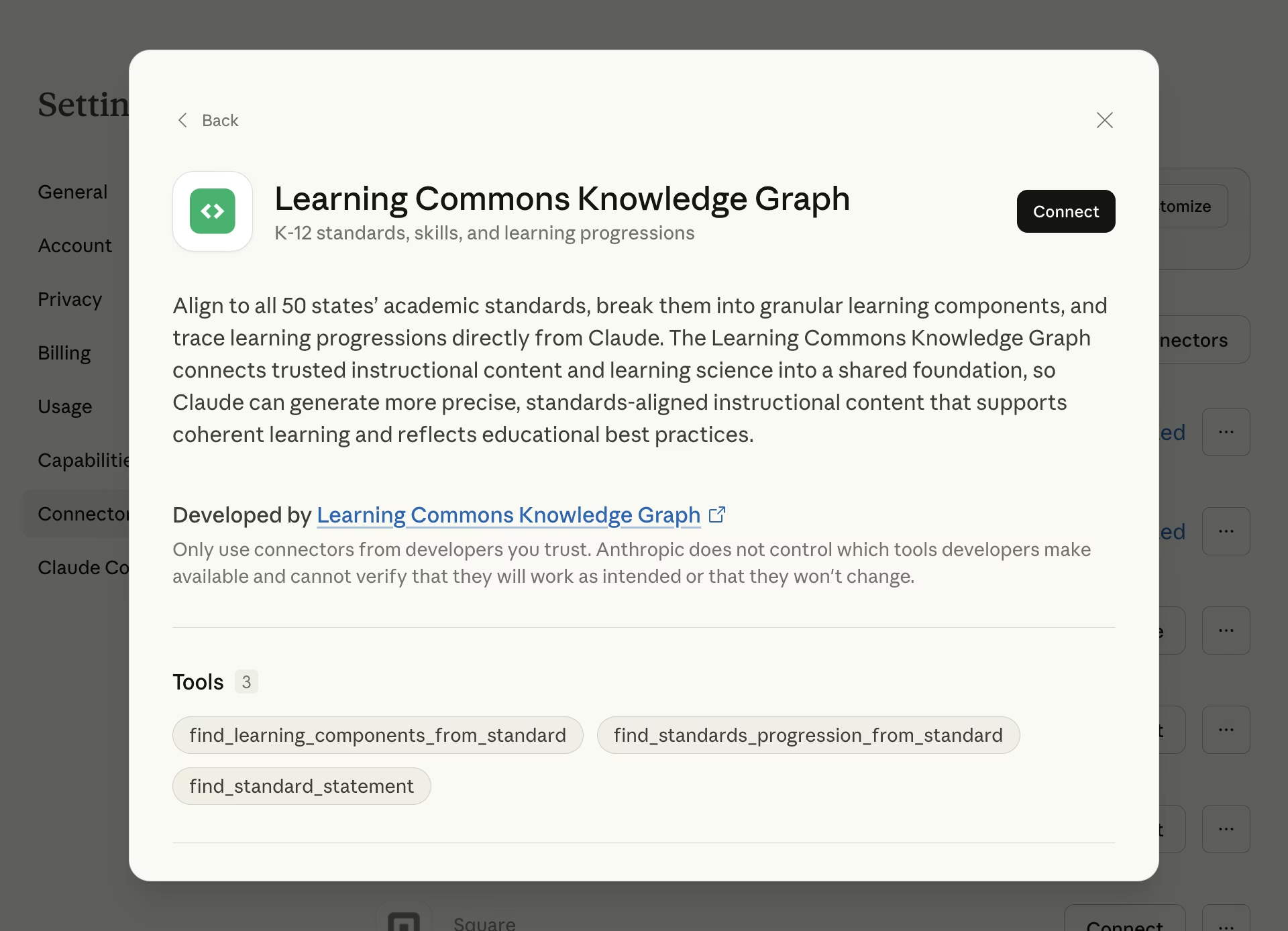 Mention the grade level, state, and/or standard code (e.g., `5.NBT.A.2` or `RL.4.1`) that you are interested in:
* "I'm a teacher in Iowa. Generate three project ideas that address W\.3.4."
* "I am a 4th-grade teacher in California. A student is struggling with 4.OA.A.3. Which prior standards should I focus on?"
Claude will use Knowledge Graph tools to look up the official statement, break [Academic Standards](/knowledge-graph/graph-reference/academic-standards) into [Learning Components](/knowledge-graph/graph-reference/learning-components), and trace [Learning Progressions](/knowledge-graph/graph-reference/learning-progressions).
## Next steps
Explore other API endpoints to access Knowledge Graph data.
See more example prompts and how the connector works behind the scenes.
Understand the data models that make up the Knowledge Graph.
See server URL, authentication, available tools, and full examples.
Follow step-by-step guides to build with the Knowledge Graph.
Mention the grade level, state, and/or standard code (e.g., `5.NBT.A.2` or `RL.4.1`) that you are interested in:
* "I'm a teacher in Iowa. Generate three project ideas that address W\.3.4."
* "I am a 4th-grade teacher in California. A student is struggling with 4.OA.A.3. Which prior standards should I focus on?"
Claude will use Knowledge Graph tools to look up the official statement, break [Academic Standards](/knowledge-graph/graph-reference/academic-standards) into [Learning Components](/knowledge-graph/graph-reference/learning-components), and trace [Learning Progressions](/knowledge-graph/graph-reference/learning-progressions).
## Next steps
Explore other API endpoints to access Knowledge Graph data.
See more example prompts and how the connector works behind the scenes.
Understand the data models that make up the Knowledge Graph.
See server URL, authentication, available tools, and full examples.
Follow step-by-step guides to build with the Knowledge Graph.